System Architecture Diagrams in Confluence with Mermaid C4
The onboarding doc says "check the architecture diagram" and the architecture diagram shows a monolith from 2023 that the team decommissioned in the spring. Nobody is lying — the draw.io file lives on one person's laptop, and the wiki holds a screenshot nobody owns. An architecture that only exists as a static export rots silently, because the thing you would edit is invisible to review.
Quick answer: document system architecture in Confluence as Mermaid text — C4Context for the system in context, architecture-beta for the deployment, block-beta for the topology you want laid out precisely — rendered by Mermaid Plus for Confluence. Every level stays an editable code block, so the wiki's architecture changes in the same review that changes the system. This post gives you three copy-paste examples.
Why the diagram is the reviewable artifact
An architecture decision is only alive while the diagram that encodes it is still linked to the change that should update it. Three properties make a Mermaid diagram survive contact with a moving system:
- It diffs. A code block changes line-by-line; the review shows the one arrow that moved, instead of a squint-diff between two screenshots.
- It lives beside the content. The context diagram sits in the same page as the architecture decision, not in a Draw.io file in someone's drive.
- It renders where it is read. The macro caches SVG at save, so the reader of a Confluence page gets a fast image and the editor gets the text.
For teams adopting C4, the gradient that matters is depth by ownership: full context for everyone, containers for the service your team runs, and no CDN sub-boxes unless your team operates CDN config.
Copy-paste 1: system context (C4Context)
The picture for the whole team — the system as one box among the actors and systems it talks to. This is the diagram for the space home page and for new-hire onboarding:
C4Context
  title System Context — Order Platform
  Person(customer, "Customer")
  System(orderApi, "Order API")
  SystemDb(orderDb, "Order Store")
  System(payment, "Payment Gateway")
  Rel(customer, orderApi, "places orders via HTTPS")
  Rel(orderApi, orderDb, "reads and writes")
  Rel(orderApi, payment, "authorizes payments")
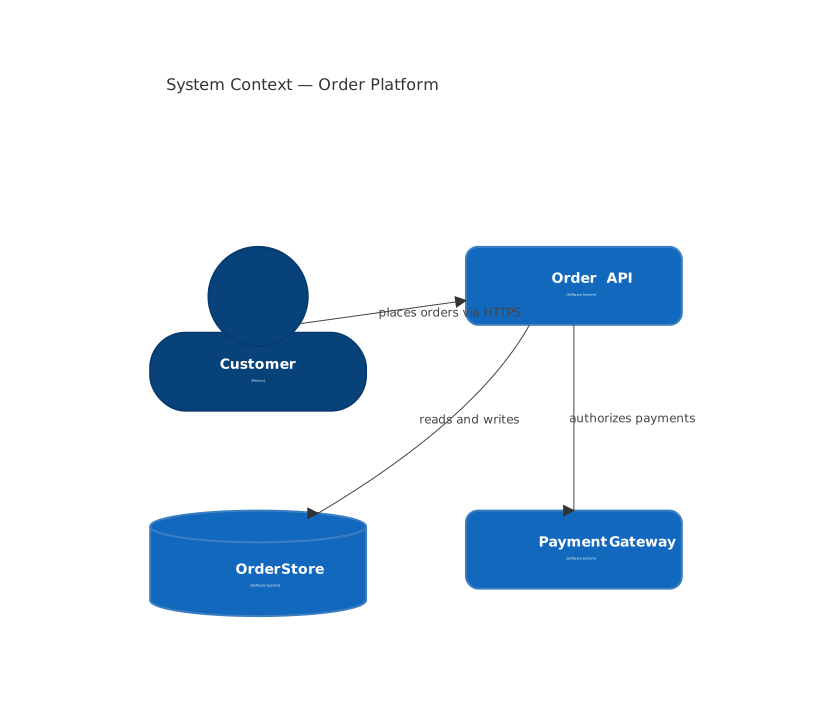
Three nodes and three arrows carry the whole contract: who talks to the platform, which store holds truth, and which external party the money depends on. If a new system joins the picture (a fraud service, a webhook consumer), the update is one line in this block.
Copy-paste 2: the service your team owns (architecture-beta)
Zoom in to the deployment around the service the team operates — load balancer in front, API behind it, database at the back. architecture-beta names the nodes with real infrastructure words rather than generic boxes:
architecture-beta
  group cloud(cloud)[Order Platform cluster]
  service lb(server)[Load Balancer] in cloud
  service api(server)[Order API] in cloud
  service db(server)[Order Store] in cloud
  lb:R -- L:api
  api:R -- L:db
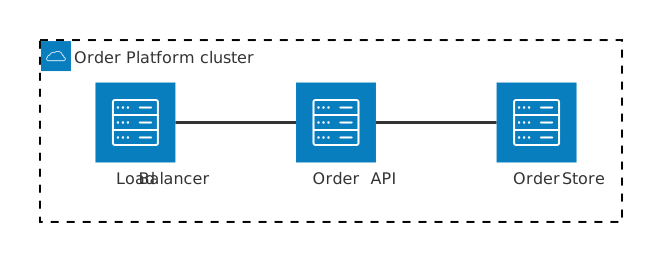
The -- links read as "talks to" without direction barging into the layout, and the group wrapper marks the shared boundary — every box inside cloud is infrastructure the on-call team owns. This is the diagram for the runbook page and the incident-playbook attachment.
Copy-paste 3: precise topology with block-beta
When the layout has to match the deployment exactly — frontend above API above database, with columns controlled — block-beta gives you explicit column rules instead of hoping the layout algorithm cooperates:
block-beta
  columns 1
  block:clients
    columns 1
    ui["Browser"]
  end
  block:apiSvc
    columns 2
    api["Order API"] db(("Order Store"))
  end
  ui --> api
  api --> db

One change from the C4 pair: columns puts the store next to the API by construction, and the db cylinder is picked by the (("…")) shape. Use this level when the reviewer needs to see the deployment as it is configured, not as a generic graph.
Keeping the three levels honest
Context diagrams rot into lies because nothing links them to change. Two habits stop that:
- Put the diagram in the change. The same PR or page edit that moves the API behind a new gateway updates the context diagram's one arrow.
- Let the coverage follow ownership. Everyone sees context; only the owning team needs the container and the topology. A diagram nobody owns is a diagram nobody updates.
A stale Mermaid block in Confluence at least sits where the change happens — the review reads the diff, someone fixes the line, and the wiki is honest again. That is the whole difference between architecture-as-export and architecture-as-text.
Where this lives beside your other architecture content
This is the C4/system layer of the diagram family; the other layers are owned elsewhere. Keep the system context + topology on the architecture page (this post), the class-level structure of one service in class diagrams, and the deployment-to-release history as a gitGraph on the release page. Same wiki, different zoom levels.
FAQ
Does Confluence have a built-in system architecture diagram tool? No — Confluence has no native diagramming. Mermaid Plus for Confluence renders C4 context, architecture and block diagrams from editable text with cached preview.
What is the C4 model and which levels belong in Confluence? C4 = context, container, component, code. In Confluence keep context and container; component/code belong with the source repository. Mermaid draws the first two as text.
C4Context vs architecture vs block — when do I use which? Context for who-plays-with-whom, architecture-beta for named infrastructure (load balancer → API → database), block-beta when you need exact layout with explicit columns. One page can hold all three.
How do I keep architecture diagrams from rotting? Make the diagram the thing the review changes — editable text means the update ships with the change that moved the system.
Render every Mermaid diagram type — C4, architecture, block, class, state and 24 more — in Mermaid Plus for Confluence, free for up to 10 users.
Try Mermaid Plus for Confluence
All 29 Mermaid diagram types with live preview and one-click templates — free for up to 10 users.
Get it on the Atlassian Marketplace