Enhanced Markdown for Confluence — User Guide
Overview
Enhanced Markdown for Confluence brings a fast, lightweight Markdown editor to your Confluence pages. Write in Markdown with a live split preview, syntax-highlighted code blocks, Mermaid and ZenUML diagrams, KaTeX and MathJax math, GitHub-flavored tables, and bidirectional scroll sync between source and preview.
The editor runs on the Quikdown engine — small bundle, no cluttered toolbar, all rendering libraries bundled locally so it works reliably inside Confluence without external CDN dependencies.
In This Guide
- Linking and Navigation inside the Markdown Macro — build a table of contents, link between sections, and get in-page anchors right. Start here if links in your macro do nothing when clicked.
Getting Started
Inserting a Markdown Block
- Edit a Confluence page
- Type
/enhanced markdownin the editor and select Enhanced Markdown for Confluence - The editor opens where you can compose your Markdown content
- Write, paste, or upload a
.mdfile - Click Save to render it on the page
Re-editing
Click on an existing Enhanced Markdown macro and select Edit to reopen the editor. Your Markdown source is preserved across edits — content is stored compressed, and existing macros continue to render without migration.
Features
Three View Modes
Pick a mode from the header to match how you want to work:
- Source — full-width Markdown editing
- Split — source on the left, rendered preview on the right (default)
- Preview — full-width rendered preview, no editing chrome
Your choice is saved per macro — reopen the editor and the same mode comes back.
Live Preview with Scroll Sync
In Split mode, scrolling one pane moves the other proportionally. Scroll the source and the preview follows; scroll the preview and the source follows. Sync is bidirectional and avoids feedback loops, so long documents stay easy to navigate.
Sync is proportional rather than line-accurate: the two panes are mapped by relative scroll position, not by matching headings. If your source and preview differ a lot in height — a long code block, a tall diagram, a wide table — the panes can drift out of alignment. Keeping headings roughly aligned between the two keeps them in step.
Code Syntax Highlighting
Fenced code blocks are highlighted automatically across 190+ languages via highlight.js, with GitHub light and dark themes that match Confluence's color scheme.
```python
def greet(name):
    return f"Hello, {name}!"
```
```bash
pnpm install && forge deploy
### Mermaid Diagrams

Render flowcharts, sequence diagrams, Gantt charts, class diagrams, state diagrams, ER diagrams, pie charts, journey maps, UML use case diagrams, and more — powered by Mermaid 12.

````md
```mermaid
graph LR
  A[Write] -->|preview| B[Review]
  B --> C{Looks good?}
  C -->|yes| D[Publish]
  C -->|no| A
Diagrams render as centered SVG inline in the page and update live as you edit.

#### UML Use Case Diagrams (new in Mermaid 12)

Mermaid 12 adds UML use case diagrams via the `usecase-beta` fence keyword. Actors, system boundaries, `include`/`extend` relationships, and notes are all supported:

````md
```mermaid
usecase-beta
direction LR

actor Customer
actor Admin

systemBoundary Store("Online Store")
  UC1("Browse Products")
  UC2("Checkout")
end

Customer --> UC1
Customer --> UC2
Admin --> UC2
UC2 ..> : include UC1
Admin --|> Customer

note for UC1 "Available 24/7"
```
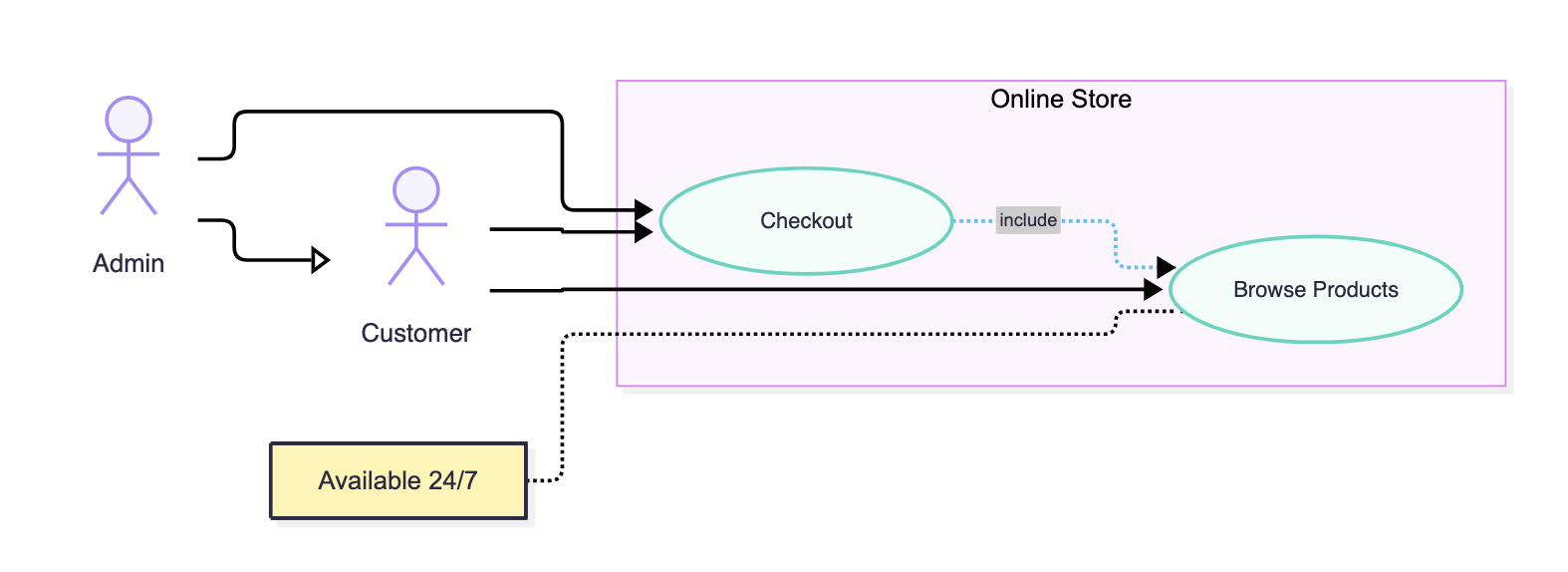
Mermaid 12 also refreshes the default look of flowchart, state, and class diagrams (new layout engine and color palettes). Existing diagrams keep working — they may simply lay out slightly differently than before.
ZenUML Sequence Diagrams
Use ZenUML's modern Actor->Message syntax for sequence diagrams.
```zenuml
participant User
participant Editor
User->Editor: type markdown
Editor-->User: live preview
```
ZenUML fences render directly, including conditionals (if/else), loops (while), parallel blocks (par), and try/catch. Like all diagrams, they are centered in the preview.
Math — KaTeX and MathJax
Render math three ways:
-
KaTeX fences for fast CSS-based rendering:
```katexE = mc^2``` -
MathJax fences (
math,tex, orlatex) for full LaTeX including\begin{align}and AMS packages:```math\begin{align}\nabla \times \vec{B} &= \mu_0 \vec{J}\end{align}``` -
Inline math with
$...$and display math with$$...$$, typeset in both source and preview:Euler's identity $e^{i\pi} + 1 = 0$ appears mid-sentence.
MathJax is bundled locally — no CDN egress required by the macro.
GitHub-Flavored Tables
Standard pipe tables render with column alignment:
| Feature       | Status |
| ------------- | :----: |
| Split editor  |   ✅   |
| Scroll sync   |   ✅   |
Upload a Markdown File
Click Upload MD in the header to import an existing .md or .markdown file directly into the editor. Useful for migrating notes from another system or pasting in a doc that lives outside Confluence.
Dark Mode
The editor and rendered output follow Confluence's theme automatically — code highlighting, diagrams, and math all switch palettes with the host page. No toggle needed.
Smart Links
Links inside the macro behave the way you'd expect:
- In-page anchors (
#section) scroll within the macro instead of navigating away - Path-rooted links (
/wiki/download/...) open correctly through Confluence rather than 404'ing inside the iframe - External links open in a host-controlled tab
Every heading in the macro gets an anchor derived from its text, so you can build a table of contents or cross-reference sections with ordinary Markdown links:
## Contents

- [Installing the client](#installing-the-client)
- [Configuring the server](#configuring-the-server)

## Installing the client

...
Headings with punctuation need care — ## API v2.0 (Beta) is anchored as #api-v20-beta, not #api-v2.0-(beta). For the full anchor rules and troubleshooting, see Linking and Navigation inside the Markdown Macro.
Tips
- Use Split mode while drafting to catch rendering issues early, then switch to Preview for a final read
- Keep one diagram per fence — multiple Mermaid blocks work, but a single block per diagram keeps source diffs clean
- For long documents, scroll sync is most useful when source and preview have similar structure (headings roughly aligned)
- Upload MD is the fastest way to migrate an existing Markdown doc into Confluence
- Existing macros from earlier versions continue to render unchanged — no migration step required
Related Blog Posts
- Markdown Editor for Confluence — Which App Should You Choose?
- Confluence Markdown vs WYSIWYG: Which Should You Use?
Support
For issues or feature requests, please visit the app's listing on the Atlassian Marketplace.