Excalidraw AI Agent for Confluence: Whiteboards You Can Talk To
Confluence holds your team's diagrams in two worlds, and the two don't talk to each other.
Text-defined diagrams — Mermaid and friends — are what AI speaks natively. They're source code, so a chat agent can read them, write them, and revise them. We shipped exactly that last week: an AI agent for Mermaid in Confluence.
Whiteboards are the other world. Freeform shapes, hand-drawn lines, arrows you drag where they need to go — the format that's actually intuitive to put in front of people. Every team has one: the architecture board on the team page, the incident flow everyone references, the onboarding map. And AI couldn't touch any of it. Ask a chat agent for a change to a whiteboard and you'd get a text description of a change, and someone still had to open the canvas and do it by hand.
That gap is why whiteboards go stale. Editing shapes one drag at a time is slow enough that nobody does it, and AI — the thing that was supposed to make maintenance cheap — had no way in.
The AI agent in Excalidraw Plus Whiteboards & AI Agent for Confluence closes the gap: the whiteboard stays what it always was — visual, intuitive, for people — but now you can operate it in plain language, from Confluence chat.
Quick answer: Open Confluence chat on any page and describe the board — "make an architecture diagram of our checkout system" draws it as an Excalidraw whiteboard right on the page. Follow-ups edit the existing shapes in place ("rename Service A to Auth Service"), the agent can search a whole space for boards, and it converts Mermaid and PlantUML into editable Excalidraw whiteboards — and back.
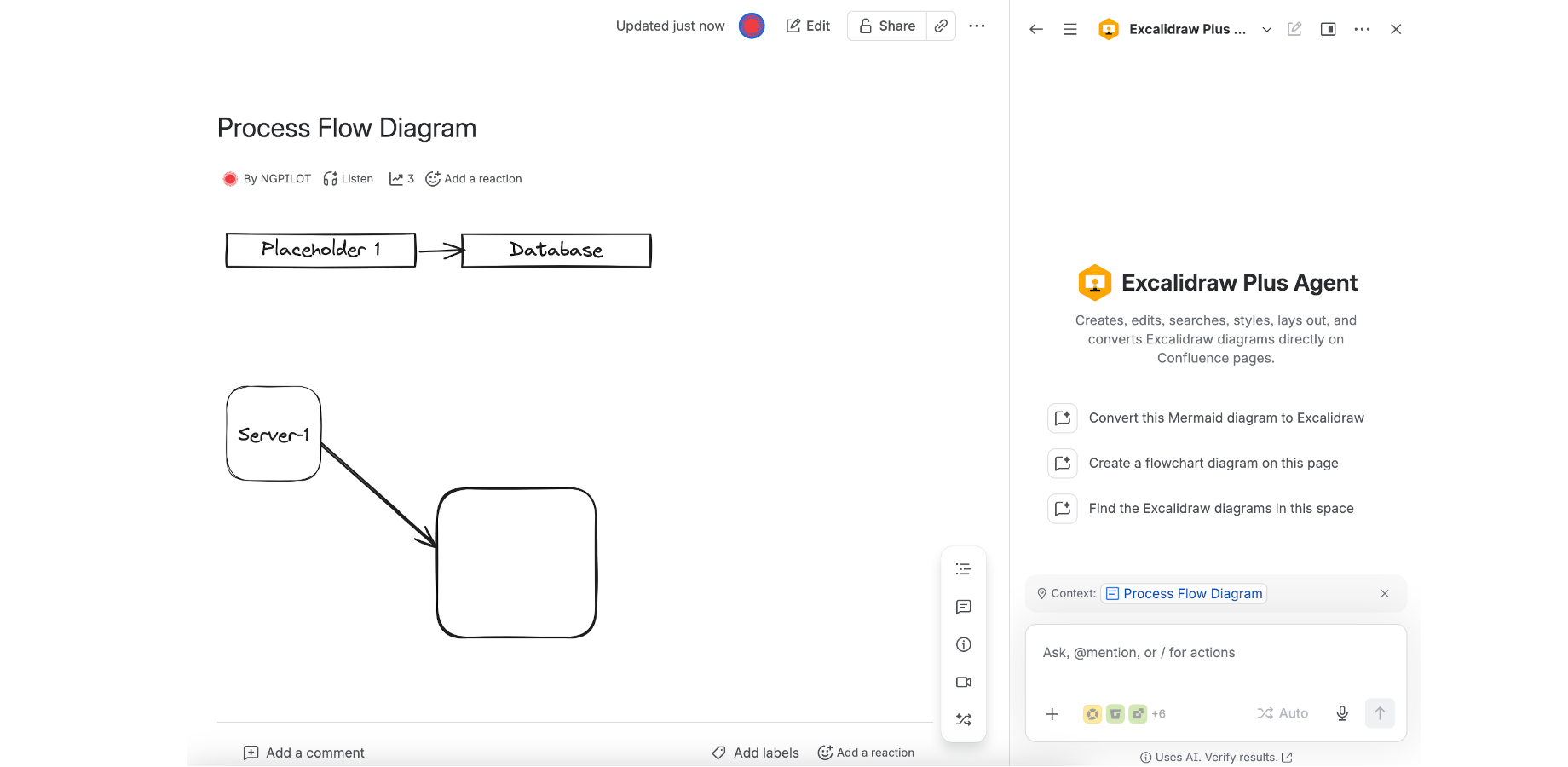
The agent lives in Confluence chat, next to the board it operates on.
What the agent can do
| Verb | What you say | What happens |
|---|---|---|
| Create | "Draw the deployment flow on this page" | An Excalidraw whiteboard is added to the page — from a template (flowchart, sequence, architecture, mindmap, kanban, wireframe) or from your own element list |
| Read | "What's in the architecture board on this page?" | The agent summarizes the board's contents in chat — every board on the page, by name |
| Edit | "Rename Service A to Auth Service" | The named shapes change; everything else stays exactly where it was |
| Style & lay out | "Group the AWS boxes and make them green" / "lay this out top to bottom" | Colors, fonts, roughness, grouping, and auto-layout applied to the existing board |
| Search | "Which pages in this space have diagrams?" | A list of pages with Excalidraw boards in the space |
| Convert | "Turn this Mermaid code block into a whiteboard" | Mermaid or PlantUML becomes editable Excalidraw shapes — or an Excalidraw board becomes Mermaid text |
The edit verb is the one that changes how whiteboards live. Until now, a board was a snapshot: right the day someone drew it, wronger every sprint after. When the agent can rename, move, group, and restyle individual shapes on command, "update the board" becomes a sentence instead of an afternoon.
The bridge runs both ways
The convert verb deserves its own note, because it's the literal bridge between the two worlds.
Text diagrams are easy for AI to write and awkward for people to read — raw Mermaid syntax is not what you put on a screen in a design review. Whiteboards are the opposite: great for people, opaque to machines. The agent moves work across that line in whichever direction the moment needs:
- Mermaid → Excalidraw. That flowchart definition sitting in a code block on your page becomes real shapes you can drag, restyle, and extend — and then keep maintaining by chat.
- PlantUML → Excalidraw. Same deal for the older PlantUML diagrams many teams have lying around.
- Excalidraw → Mermaid. And when a board needs to live as text — to diff in a PR, to version with the code it documents — the agent converts it back out.
Converted boards are real elements on the canvas, not screenshots. Everything the agent can do afterwards — edit, style, layout — applies to them the same as to anything drawn by hand.
If you read the Mermaid agent post: that agent lives on the text side and turns text into rendered diagrams. This one lives on the canvas side and turns text into editable drawings. Same chat, two destinations — pick by audience, not by tool.
A working session
The scenario this was built for: the architecture board on your team page, three sprints out of date.
- Open Confluence chat on that page and start where the board is wrong: "Rename Service A to Auth Service, and add a caching layer between it and the database."
- Keep going in the same breath: "Group the three AWS boxes into one container, and make the whole group green."
- Tidy up: "Lay this out top to bottom." The agent rearranges the board into a clean top-down flow — you're not dragging eleven boxes into alignment yourself.
- Then answer the question you actually get asked: "Which other pages in this space have architecture diagrams?" — because there are always four more, equally stale.
- Hand off when it matters: the board is a normal Excalidraw macro. Anyone can click it and adjust by hand; the agent checks the latest saved version before each write, so its edits don't overwrite what a teammate changed an hour ago.
A detail that matters on real pages: one page can hold several boards, and the agent keeps track of which is which. "Update the deployment flow, not the network map" works.
Where you take over
The agent is honest about its limits, and so are we:
- Layout is deliberate, not freeform. Auto-layout today means top-to-bottom flow or a grid. Ask for a radial tree and the agent will tell you those are the two it does — then you arrange the rest by hand, once, and the board stays put.
- Chat shows no pictures. The agent works on the board's data, so it replies with what changed and a link to the page — you look at the result where everyone else will.
- Deletion has a seatbelt. Ask it to remove one of five similar boxes and it checks with you first, rather than guessing which one you meant.
- Anything sacred stays hand-drawn. For boards that are compliance artifacts or just carefully art-directed, edit on the canvas as always — nothing the agent does is locked in, and nothing you hand-tune gets quietly redrawn.
Not an agent-only app
The chat is one of two ways in, and the classic editor is unchanged — type /excalidraw and you get the full whiteboard: freehand drawing, 220+ built-in shape libraries, templates from flowcharts to wireframes, and built-in Mermaid rendering in the same app. Manual first, agent when you want speed. Both write the same kind of macro, so a board that started in chat is indistinguishable from one drawn by hand.
Prompts to try on your first day
- "Draw an architecture diagram of our checkout system — web, API, payments, inventory."
- "Rename Service A to Auth Service and move it next to the API gateway."
- "Group the three AWS boxes and make them green."
- "Which pages in this space have Excalidraw diagrams?"
- "Convert the Mermaid flowchart in this page's code block into an editable whiteboard."
- "Lay this board out top to bottom."
Related resources
- Excalidraw Plus Whiteboards for Confluence — full feature guide and documentation
- Mermaid AI Agent for Confluence — the text-side twin: create, read, update, and convert Mermaid by chat
- draw.io vs Mermaid in Confluence — when the source text stays the diagram, and when shapes win
- Best diagram tool for Confluence — Mermaid vs Excalidraw vs Graphviz
Ready to try it? Install Excalidraw Plus Whiteboards & AI Agent for Confluence → — free for up to 10 users.
Try Excalidraw Diagrams plus Whiteboards for Jira
Add a freehand drawing canvas to every Jira issue, with 229 shape libraries — free for up to 10 users.
Get it on the Atlassian Marketplace