Migrating from Other Mermaid Apps
Related page: Mermaid Plus User Guide
Overview
If your team has diagrams created with another Mermaid app, the Migration page can scan a Confluence space, find those diagrams, and convert them into rendered Mermaid+ diagrams — in place, without recreating anything by hand.
Supported source apps:
- Mermaid Chart (Mermaid Chart Inc)
- Mermaid Diagrams for Confluence (Stratus Add-ons)
- Mermaid diagrams viewer (Atlassian Labs)
- Mermaid Charts & Diagrams (weweave)
- Mermaid for Confluence (Tech Labs)
Before You Start
- Open the page from Confluence → Apps → Mermaid+ Migration
- You will see the spaces you can access; converting a page requires permission to edit it
- Pick one source app at a time — the scan only looks for that vendor's macros
- Every conversion is recorded in page history, so any page can be rolled back
Migrating Diagrams
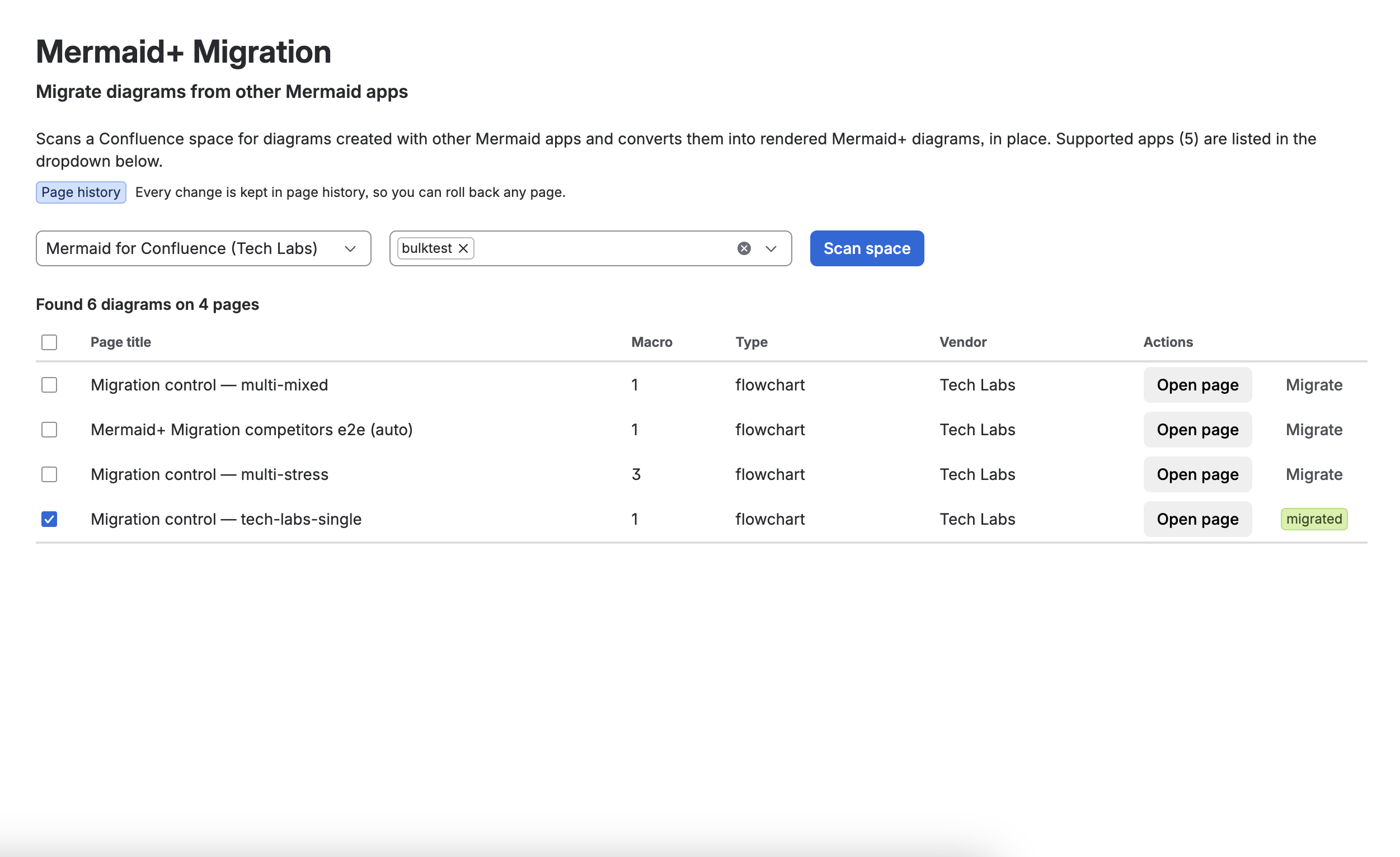
- Open Confluence → Apps → Mermaid+ Migration
- In Supported apps, pick the vendor your diagrams were created with (the counter in the placeholder shows how many are supported)
- In Choose space(s), pick one or more spaces to scan
- Click Scan space — progress shows pages read so far
- Review the results table: each row lists the page title, number of macros, diagram types and the vendor
- Tick the pages to convert and click Migrate selected, or use the Migrate button on a single row
- Open a migrated page to confirm the diagrams render — use page history to roll back if needed
Reading the Results Table
| Column | What it shows |
|---|---|
| Page title | Full title on hover; long titles are truncated |
| Macro | How many convertible diagrams were found on the page |
| Type | Diagram types detected (flowchart, gitGraph, …) |
| Vendor | Source app the macros belong to |
| Actions | Open the page, or convert it |
Pages with no convertible diagrams (including pages with ordinary code blocks that are not diagrams) are excluded from the results automatically.
What Gets Converted
- Each competitor macro is replaced in place with a Mermaid+ diagram at the same position
- Ordinary code blocks that are not Mermaid diagrams are never touched
- A page can be migrated again safely — already-converted diagrams are not duplicated
- Content that cannot be read automatically (for example damaged or incomplete macros) is reported per page instead of failing silently
FAQ
Do I need to keep the old app installed? No. The source text is read from the page storage itself. After migrating, the old app can be removed.
Does migration change who can see or edit my pages? No. Pages, permissions and history are untouched — only the diagram macros are replaced.
One app scanned fewer diagrams than another — why? Each scan only matches the vendor you selected. A space containing diagrams from several apps needs one sweep per app.