UML Use Case Diagrams in Confluence (Mermaid, Copy-Paste)
The use case diagram is the scope picture: actors on the outside, what the system does for them on the inside, and — the reason product and engineering fight — the line between them. In Confluence that picture usually comes from a diagramming tool export that goes stale the moment scope moves.
Mermaid 12 added the syntax to render UML use case diagrams from text — usecase-beta — and Enhanced Markdown for Confluence renders it in the same macro as everything else on the page. This guide gives you the syntax and two copy-paste diagrams.
Quick answer: To draw a UML use case diagram in Confluence, install Enhanced Markdown for Confluence and use a ```usecase-beta fence in its Markdown macro. Actors, system boundaries, use cases, include and generalization arrows — all plain text, rendered live, editable forever. Free for up to 10 users.
A Payments Platform, in Twelve Lines
Paste this into a ```usecase-beta fence:
```usecase-beta
direction LR

actor Customer
actor Merchant

systemBoundary Platform("Payments Platform")
  UC1("Pay Invoice")
  UC2("Issue Refund")
  UC3("View Statement")
end

Customer --> UC1
Customer --> UC3
Merchant --> UC2
Merchant --> UC3
UC2 ..> : include UC1
```
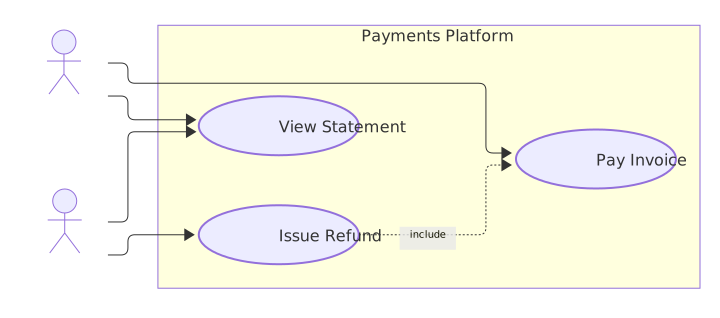
What the syntax buys you: two actors, a labeled boundary, three use cases, and one include that says refunds always exercise the payment rail — the kind of scope statement that takes a paragraph of prose to say and survives scope changes as a one-line edit.
The Syntax in One Table
| Token | Meaning | Example |
|---|---|---|
actor X | An actor — person or external system | actor Customer |
systemBoundary Name("Label") | The system's edge, with a label | systemBoundary Platform("Payments Platform") |
UC1("Label") | A use case inside the boundary | UC1("Pay Invoice") |
A --> UC | Actor interacts with use case | Customer --> UC1 |
UC2 ..> : include UC1 | One use case always invokes another | refund includes payment |
| `Admin -- | > Guest` | Generalization — role inheritance |
note for UC1 "text" | Attach a note to an element | note for UC1 "Available 24/7" |
direction LR | Layout direction | LR for wide diagrams |
A Second Diagram — Roles and Compliance
The pattern that shows why generalization and notes matter — an admin console:
```usecase-beta
direction LR

actor Admin
actor Auditor
actor Guest

systemBoundary Console("Admin Console")
  UC1("Manage Users")
  UC2("Export Audit Log")
  UC3("View Dashboard")
end

Admin --|> Guest
Admin --> UC1
Admin --> UC3
Auditor --> UC2
UC2 ..> : include UC3
note for UC2 "Exports require MFA"
```
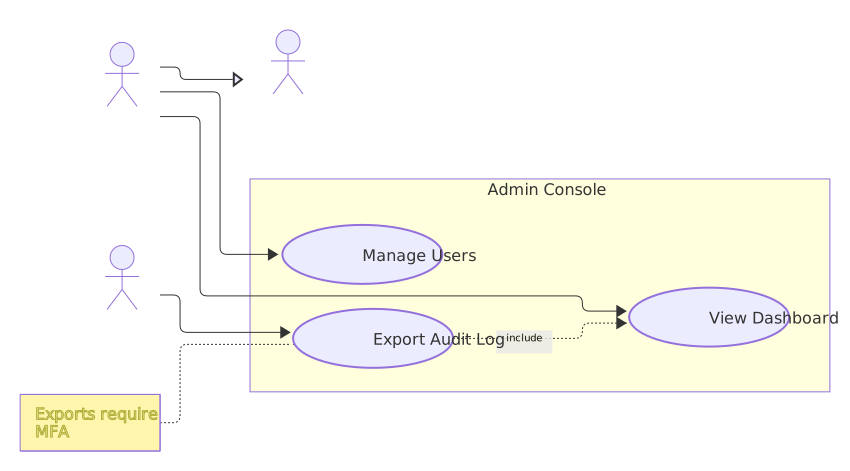
Admin --|> Guest says admins inherit everything a guest can do — one line instead of drawing the guest's edges twice. The note pins the compliance constraint to the exact use case it constrains, where a reviewer will actually see it.
Where Use Case Diagrams Fit Next to the Others
| Question the reader asks | Diagram | In the same macro |
|---|---|---|
| What is in scope, and for whom? | Use case (usecase-beta) | yes |
| How does a flow execute, step by step? | Sequence (zenuml / sequenceDiagram) | yes |
| How do entities relate? | ER diagram | yes |
| What is the decision logic? | Flowchart | yes |
One macro renders all of them, so a design doc keeps its scope picture, its flow, and its data model as text on one page. Install Enhanced Markdown for Confluence, paste the payments example, and adjust the boundary to your own scope. Free for up to 10 users.
Related Guides
- ZenUML Sequence Diagrams in Confluence — the flow view that pairs with the scope view
- Mermaid 12 in Confluence and Jira — what the newest Mermaid release adds
- Create Mermaid Diagrams in Confluence — the full diagram family from the same macro