Swimlane Process Diagrams in Confluence with Mermaid (Copy-Paste)
The ticket sits in "Waiting on customer" for a week and nobody noticed, because the handoff between first-line support and the dev team is a tacit step: Support marks it "escalated" in one field, Engineering is supposed to watch a filter, and the transfer never surfaces as its own action. That inert weekend is a process bug, and the fix is to see the handoff. A swimlane diagram makes the ownership transfer its own crossing arrow — invisible to everyone until it is drawn.
Quick answer: map cross-functional processes in Confluence as Mermaid swimlane-beta, rendered by Mermaid Plus for Confluence. One lane per actor, steps sequenced inside lanes, and the handoff is the arrow that crosses a lane boundary. When the interaction is a short request/response instead of long-running work, switch to a sequenceDiagram. This post gives you three copy-paste examples.
Why the handoff is the whole point
A flowchart shows what happens in order. A swimlane shows who owns it at each moment — and ownership transfer is where most process failures sit:
- Every step has exactly one owner. If a step lists two teams, it is two steps; the swimlane forces that split.
- The crossing arrows are the SLA points. The moment a ticket leaves Support and enters Engineering is when the clock should re-start its countdown.
- The gray lanes are people. A lane named "Customer" makes it obvious that the process spends half its time with the customer — the queue insight a logic flowchart hides.
When you read a swimlane, read the boundaries crossed, not the steps — the crossing is the risky part of the process.
Copy-paste 1: support ticket routing
The canonical swimlane: a ticket that moves through ownership, each lane holding its own steps and the boundaries showing who-when:
swimlane-beta LR
  subgraph Customer
    c1[Files a ticket]
    c2[Gets an answer]
  end
  subgraph Support
    s1[Screens and triages]
    s2[Answers or escalates]
  end
  subgraph Engineering
    e1[Fixes and patches]
    e2[Marks resolved]
  end
  c1 --> s1
  s1 -->|answers| c2
  s1 -->|escalates| e1
  e1 --> e2
  e2 --> c2

Read the three crossings: Support → Customer (an answer), Support → Engineering (an escalation), Engineering → Customer (a resolution). If the escalation leg sat dormant for days, the diagram points at the exact boundary where the clock stalled — because the crossing is a visible arrow, not a field value.
Copy-paste 2: approval workflow across roles
Approvals are the richest swimlane subject — every step changes owner, and the approval is a crossing. Map the purchase approval with handoffs labeled with what transfers:
swimlane-beta LR
  subgraph Requester
    r1[Submits request]
    r3[Receives decision]
  end
  subgraph Manager
    m1[Reviews]
    m2[Approves or returns]
  end
  subgraph Finance
    f1[Checks budget]
    f2[Records and pays]
  end
  r1 --> m1
  m1 -->|returns| r3
  m1 -->|forwards| f1
  f1 -->|denies| r3
  f1 --> f2
  f2 --> r3

The return paths (Manager → Requester, Finance → Requester) are drawn, not implied — the diagram states that a deny is a first-class outcome. Every handoff carries the noun (the request, the decision, the payment), which is exactly the wording a process audit wants to check.
Copy-paste 3: the interaction as a sequence
When the process is a conversation — a request going back and forth — a sequence diagram is the right tool: time flows down, actors call out sideways, and the read is a transcript:
sequenceDiagram
  participant C as Customer
  participant S as Support
  participant E as Engineering
  C->>S: Ticket created
  S->>S: Triage and priority
  S->>E: Escalate (with notes)
  E->>S: Patch deployed
  S-->>C: Resolved with summary
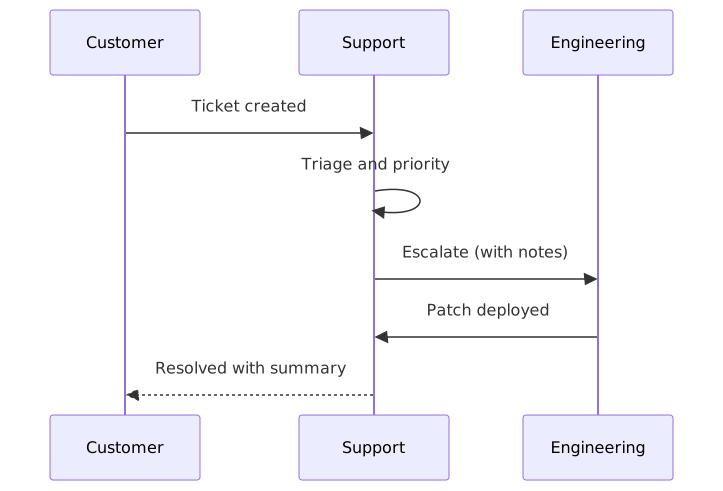
Same scenario as example 1, different read: the sequence diagram shows the conversation — who said what to whom, in what order — while the swimlane showed ownership over time. The rule of thumb: work that queues = swimlane; interaction that alternates = sequence. Keep both on the runbook page.
Choosing between swimlane and sequence
| Process shape | Diagram | Why |
|---|---|---|
| Work passes through teams, held in queues | Swimlane | Ownership transfer and the queue are visible |
| Actors exchange messages back and forth | Sequence | The transcript, in time order, is the point |
| One actor decides, all steps internal | Flowchart | No ownership boundaries to draw |
The three overlap less than they seem: if your process has no lane-crossing arrows, you likely need a flowchart; if it has no time-ordered conversation, you likely need the swimlane.
The process's downstream neighbors are on the same wiki: the decision points inside the process as a state machine and the team workload across the work as a Kanban board.
FAQ
Does Confluence have a built-in swimlane diagram tool?
No — Confluence has no native diagramming. Mermaid Plus for Confluence renders swimlane-beta and sequenceDiagram from editable text with a live preview.
Swimlane or sequence diagram for a process? Swimlane for long-running work moving through teams (queues, ownership), sequence for alternating request/response interactions. Mark the queue in the swimlane, the transcript in the sequence.
How do I show a handoff in a swimlane diagram? The arrow that crosses a lane boundary is the handoff — label it with what transfers (ticket, approval, file) and the ownership change becomes a first-class step.
How do I avoid swimlane spaghetti? Keep one step per lane per column, flow left to right, and collapse round-trips into a single labeled arrow. When every step crosses lanes, reconsider whether the lanes are right.
Render every Mermaid diagram type — swimlane, sequence, flowchart, state, kanban and 24 more — in Mermaid Plus for Confluence, free for up to 10 users.
Try Mermaid Plus for Confluence
All 29 Mermaid diagram types with live preview and one-click templates — free for up to 10 users.
Get it on the Atlassian Marketplace