Create Jira Issues from Templates (3 Methods)
- Jira admins and project leads standardizing ticket creation across teams
- Engineering teams who retyped the same bug/incident/story structure every week
- Anyone asked "is there a template for this?" and wanting a real answer
- Why Jira's native project templates don't solve per-ticket templating
- Three ways to create issues from templates (starter library, custom, GitHub import)
- How variables like
\{\{currentUser\}\}and\{\{today+7d\}\}make templates dynamic - Auto-applying templates so the right one loads for each issue type
The scenario every Jira team hits: a new bug comes in, and the reporter writes "it's broken" with no steps to reproduce, no environment, no severity. Or an incident gets logged without the services-affected checklist. You write a Confluence page titled "How to file a good bug," link to it from the project home, and nobody reads it. The tickets keep coming in malformed.
The real fix is to put the template on the ticket — so the moment someone opens Create Issue for a bug, the description already has the "Steps to reproduce / Expected / Actual / Environment" structure, the right labels, and the right assignee. That's per-issue templating, and Modern Issue Templates for Jira does exactly that. This guide covers three ways to create issues from templates, from quickest to most customized.
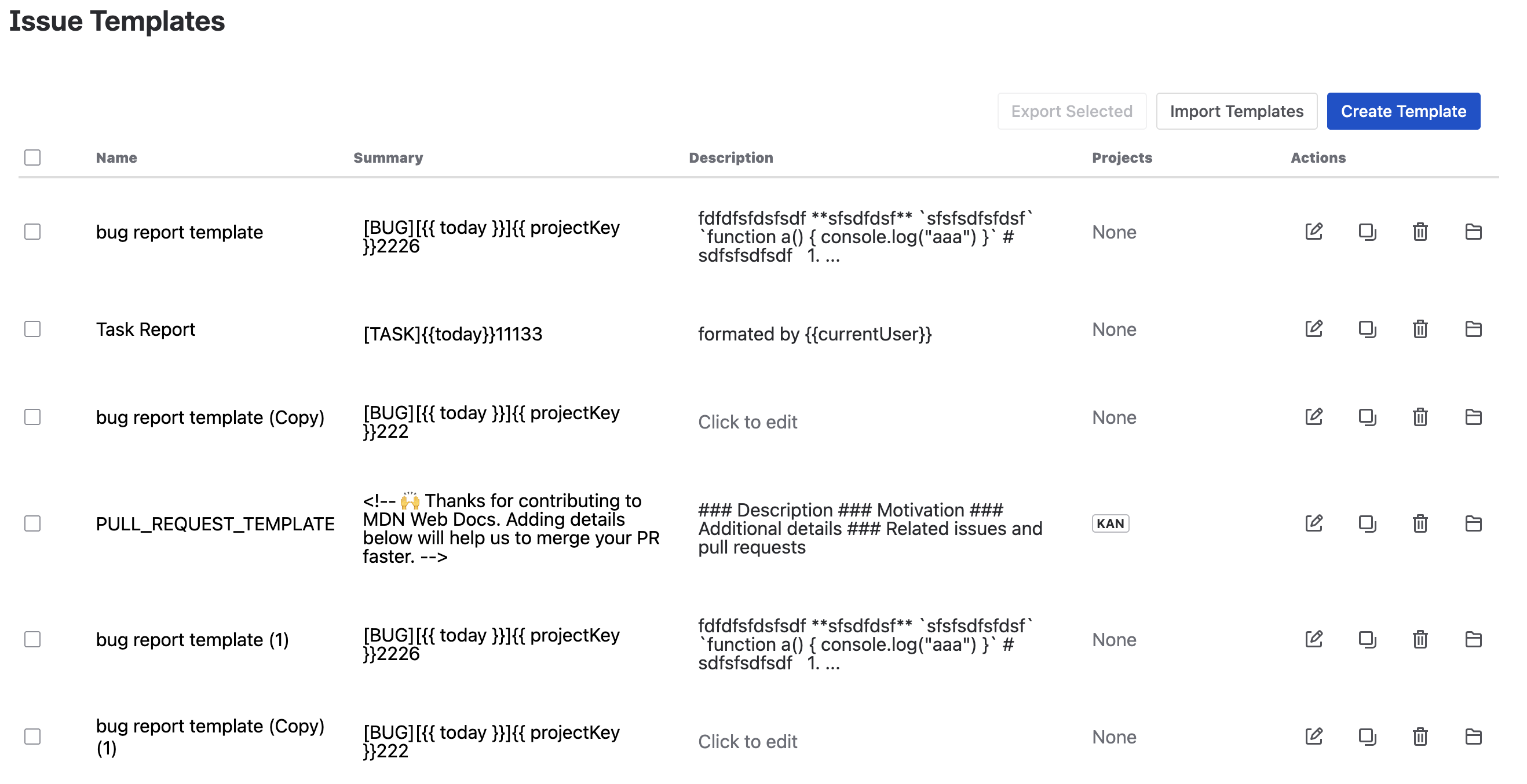
First: Jira project templates vs. issue templates — the distinction that matters
Jira ships with project templates (Scrum, Kanban, Bug Tracking) — but these only set up the project's scheme, issue types, and workflow. They do not pre-fill the content of individual issues. When someone creates a bug, they still start with a blank description.
Issue templates are different: they pre-fill the summary, description, labels, components, and even custom fields of each new issue, based on its type and project. That's the gap Modern Issue Templates fills. If your team has a structure every bug/incident/story should follow, issue templates enforce it at creation time — no Confluence page required.
Method 1: The Starter Library (fastest — 2 minutes)
The fastest path to value is the curated Starter Template Library: 22 pre-built templates across Software Engineering, Operations, Product, Team & People, and General. Every template ships with summary and description pre-filled, and uses variables so it works out of the box.
- In Jira, open Apps → Modern Issue Templates.
- Click Starter Library in the toolbar.
- Filter by category (e.g., Software Engineering) or browse all 22.
- Click Import on the templates you want — they land in your template manager.
- Assign each imported template to the project(s) where it should apply.
This gets a team from zero to standardized tickets in two minutes, without authoring anything. The imported templates are fully editable, so you can tweak them after import.
Common starters teams grab first:
- Bug report — Steps to reproduce / Expected / Actual / Environment / Severity
- Incident — Summary of impact / Affected services / Detected by / Mitigation
- Feature request — Problem / Proposed solution / Success metric / Dependencies
- Spike — Question to answer / Context / Timebox / Output
Method 2: Create a custom template from scratch
When the starters don't fit, author your own.
- Open Apps → Modern Issue Templates → New Template.
- Fill in the Summary (the issue title template) and Description (the body template). Both support rich text.
- Use variables to make the template dynamic (see below).
- Assign the template to a project and issue type.
Variables that make templates dynamic
Hardcoded templates go stale. Variables keep them accurate per-issue:
| Variable | Resolves to | Example use |
|---|---|---|
{{currentUser}} | The user creating the issue | "Reported by \{\{currentUser\}\}" |
{{today}} | Today's date | "Detected: \{\{today\}\}" |
{{today+7d}} | Today + 7 days | "Mitigation due: \{\{today+7d\}\}" |
{{projectKey}} | The project key | "Impact area: \{\{projectKey\}\}" |
So a bug template's description might read:
h3. Steps to reproduce
1.
2.
3.

h3. Expected

h3. Actual

h3. Environment
- Reporter: {{currentUser}}
- Detected: {{today}}
- Severity: (S1 / S2 / S3)
Every new bug created from this template gets the reporter and date filled in automatically — no manual entry, no inconsistency.
Method 3: Import from GitHub / Markdown / JSON
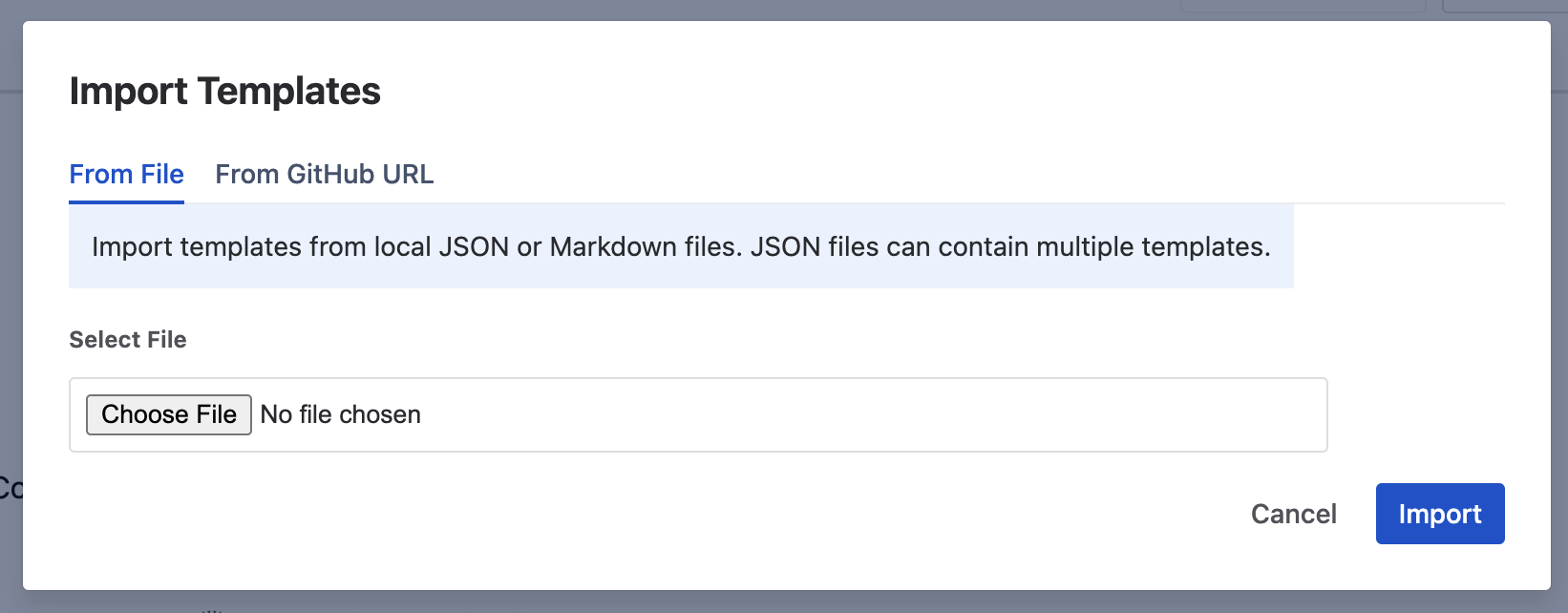
If your team already maintains issue templates in a GitHub repo (.github/ISSUE_TEMPLATE/), or writes them in Markdown, you don't need to re-author them in Jira. Modern Issue Templates imports directly from those sources.
- Open Apps → Modern Issue Templates → Import.
- Choose the source: GitHub (paste a repo URL or raw file URL), Markdown (paste text or upload
.md), or JSON (paste or upload). - Map the imported content to the template's summary and description fields.
- Assign to projects.
This is how teams migrating from GitHub Issues to Jira preserve their existing template investment instead of rewriting it.
Auto-applying templates by issue type
The goal is for the right template to load automatically based on the issue type and project, with no manual template selection. Assign templates to projects in the template manager, and the app detects conflicts (two templates competing for the same issue type in the same project) and warns you.
When configured:
- Creating a Bug in the ENG project → loads the bug template
- Creating an Incident in the OPS project → loads the incident template
- Creating a Story anywhere → loads the story template
The reporter doesn't need to know a template exists — they just create the issue and the structure is there.
Multi-field pre-fill (Advanced edition)
Beyond summary and description, the Advanced edition pre-fills labels, due date, components, and custom fields at issue creation. This is useful for compliance-driven workflows where, say, every incident must carry a specific label and component without relying on the reporter to remember.
FAQ
Does Jira have built-in issue templates?
Jira has project templates (Scrum, Kanban, etc.) that set up a project's scheme, but it does not have per-issue content templates out of the box. To pre-fill the summary, description, and fields of individual issues, you need a Marketplace app like Modern Issue Templates for Jira.
Can I import GitHub issue templates into Jira?
Yes. Modern Issue Templates imports issue templates from GitHub repositories (.github/ISSUE_TEMPLATE/), as well as from Markdown files and JSON. This lets teams migrating from GitHub Issues to Jira keep their existing template structure.
How do template variables work?
Variables like {{currentUser}}, {{today}}, {{today+7d}}, and {{projectKey}} are resolved at issue creation time. When a user creates an issue from a template, the variables are replaced with real values — the current user, today's date, a date offset, or the project key. This keeps templates accurate without manual editing.
What is the difference between Modern Issue Templates Standard and Advanced?
Both editions include template CRUD, the rich-text editor, GitHub/Markdown/JSON import, the 22-template starter library, variables, and multi-project assignment. The Advanced edition adds multi-field pre-fill (labels, due date, components, custom fields) and a full application log with CSV export. Both are free for up to 10 users.
How many templates come in the Starter Library?
22 pre-built templates across 5 categories: Software Engineering, Operations, Product, Team & People, and General. Each ships with summary and description pre-filled and demonstrates the variable system. They are fully editable after import.
Is Modern Issue Templates for Jira free?
Yes — Modern Issue Templates is free for up to 10 users. Beyond 10 users, per-user pricing applies (Standard and Advanced tiers), scaling down as the team grows.
Related guides
Try Modern Issue Templates for Jira
Create issues from reusable templates with variables, GitHub import, and auto-apply — free for up to 10 users.
Get it on the Atlassian Marketplace